FortiGate-VM Hub-and-Spoke Lab: AWS Transit Gateway
Overview
This hands-on lab demonstrates how to protect distributed AWS workloads using a centralized security hub architecture.
You will deploy a FortiGate-VM to inspect:
- Egress traffic from workload VPCs to the Internet
- East-west traffic between workload VPCs
- Ingress traffic from the Internet to published workload services
AWS Transit Gateway provides connectivity between the FortiGate security hub and the workload VPCs.
Disclaimer
This environment is intended only for hands-on workshops and demonstrations. Do not use it in production without an appropriate security review, architecture validation, and additional hardening.
Lab Credentials
Each student is assigned an individual set of temporary AWS credentials and FortiGate licensing information.
Before starting the lab:
- Open the Lab Credential Portal.
- Enter the shared lab access key provided for the workshop.
- Enter your assigned Student ID, for example
student01. - Select Show my credentials.
- Keep the credential page open during the lab.
The portal displays only the record assigned to the submitted Student ID.
The credential set includes:
- AWS account ID
- IAM username
- AWS Console password
- AWS access key ID
- AWS secret access key
- FortiFlex token
- FortiGate serial number
Important
Use only the credentials and license information assigned to your Student ID.
Do not share, photograph, store in an unsecured location, or reuse these values outside this lab.
INFO
The credentials and FortiFlex entitlement are temporary and may stop working after the workshop access period ends.
Lab Architecture
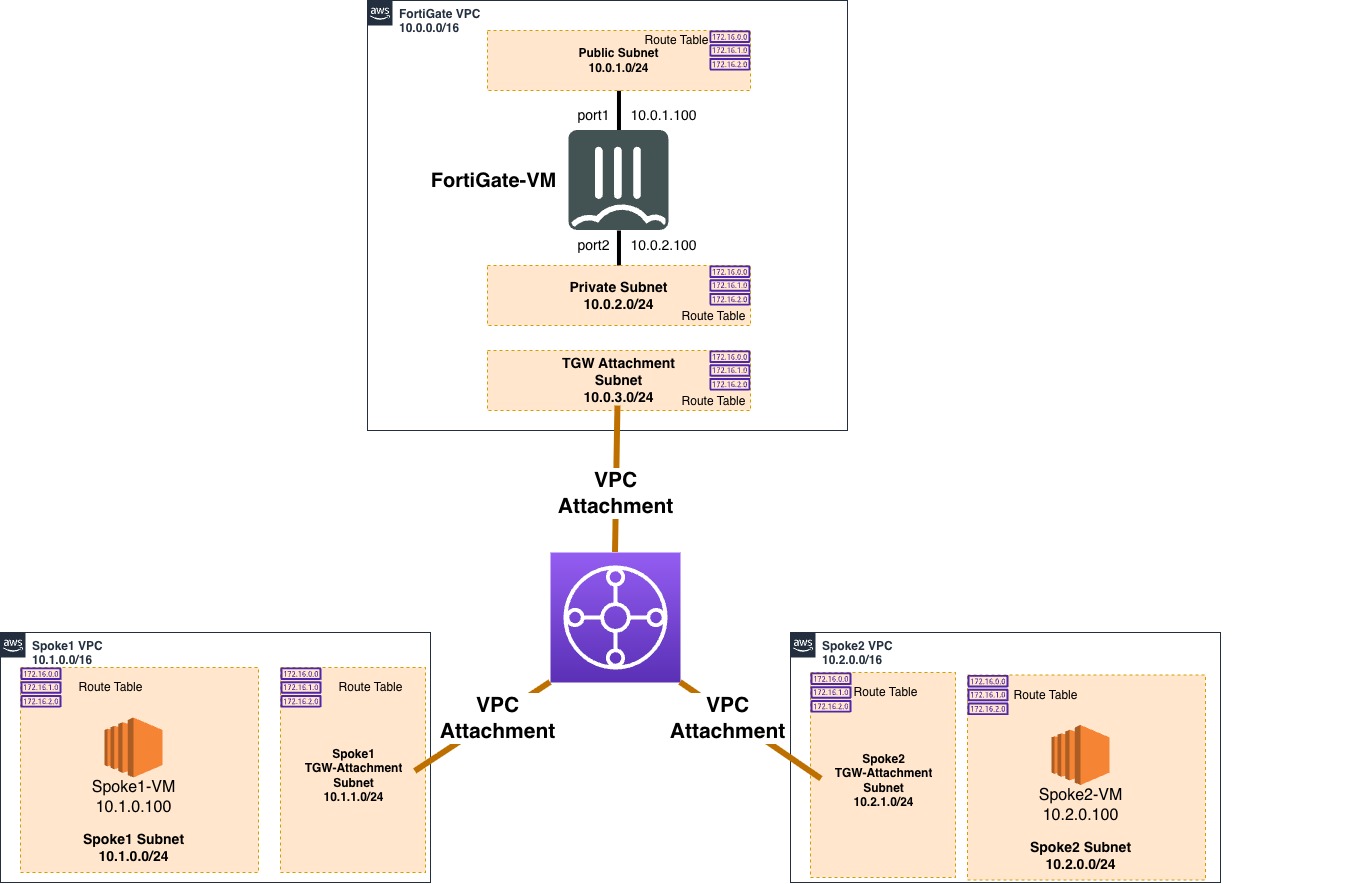
The CloudFormation template automates the deployment of the following components:
- Central security hub: A VPC containing the FortiGate-VM inspection point.
- AWS Transit Gateway: The cloud router connecting the security hub and workload VPCs.
- Workload spokes: Two separate VPCs containing Ubuntu web servers.
- Centralized traffic flow: Egress and east-west traffic from the spoke instances is routed through AWS Transit Gateway to the FortiGate private interface for security inspection.
Lab Diagram
Lab Sections
- Retrieve your lab credentials and licensing information, access AWS, and create an SSH key pair.
- Subscribe to the FortiGate BYOL AMI and deploy the lab environment.
- Log in to, license, and verify the FortiGate-VM.
- Configure the FortiGate AWS SDN Connector.
- Test egress, east-west, and ingress traffic inspection.
- Delete the lab resources.
AWS Region
Complete all exercises in the AWS Frankfurt Region:
eu-central-1Region consistency
Resources created in another AWS Region will not appear in the Frankfurt consoles used throughout this guide.
Next Step
Continue to Section 1: Lab Preparation.